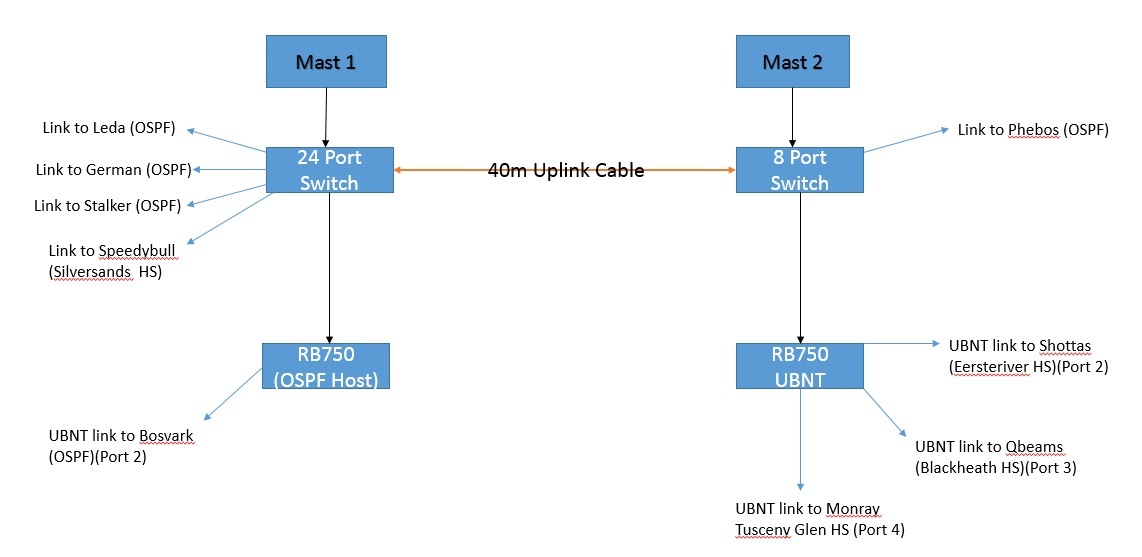
My current PTP links to my clients was via rb433 and grids but they now upgraded to ubnt as they will be hosting there own HS. When i setup the ubnt bridges my entire network went down. So i was informed that on RB750 ports shud not be bridged as the ubnt creates the bridge.
So this will require me to rather get another RB750 and not bridge ports and jst plug all ubnt devices in there? have dedicated RB750 just for ubnt?
How does one assign IP address as i was told i should use 2x of my IP address one on the device my side and one on the device there side. And how will the routing be done as in total there wil be 4x ips?
My side:
1x rb750
1x ubnt device
There side:
1x rb750
1x ubnt
If possible has anyone mybe drawn up manual or diagram how to incorparte ubnt into your network could you please share as most of my area guys hosting HS is moving to ubnt as main links and clients mikrotik
Correct cant be in bridge. Ip address does he have his own range then can use his range your side as well then not all ip address come from your range. Ya RB750 to do the routing on. I have a mix of ubnt and mikrotik. As for manual probably no one will have. Diagram some might have or be able to pull one from some monitoring software.
I have rb750 were my OSPF is on. Which is in room 1. Room 2 im just using normal switch for all clients.
Example: if i run port 5 non bridge into 16port switch will i be able to connect all the ubnt devices into that switch or wont that work
Before plugging in the ubiquity into the RB750 Setup the Ubiquity RB in network bridge mode and assign an unused /29 wug ip to it.
It should look as follow: Example range is 172.18.60.0/29. So ubiquity should be set to 172.18.60.2 ,subnet to 255.255.255.248 and gateway to 172.18.60.1 .
Plug Ubiquity RB into its own port on the RB750.
Remove that port from ANY switch group or bridge.
Assign the same /29 range that you used on the ubiquity RB on that port. So it should look as follow: ip address: 172.18.60.1/29 .
Now all thats left to do on your side is to setup OSPF on that port and add it to OSPF network
On the other side of the link the setup should be exactly the same except the he should use 172.18.60.3 as his ubiquity IP and 172.18.60.4 as his gateway. Then assign 172.18.60.4/29 on an unused port on his RB750 and plug the ubiquity into that.
Sorry typed this on my phone quickly. Hope ot helps
Thanx alot it helps alot with Ip assign ideas. So from what u are saying is that a ubnt device needs to go into rb750 it cannot be plugd into normal 16port switch as the ip assign needs to be port specific
From what you guys said my layout should look like this to integrate UBNT each room should have a RB750 for UBNT devices Mikrotik Devices can be plugged into normal switch
@Gekido ,Shottas and Qbeams will in future run OSPF currently they are just hosting clients via PTP links. Orgon reserverd /24 ip range for future sites. So i will break that /24 ip range in half or in 3 and will be split between Qbeams and Shottas so all routing can be done from there HS as they will Broadcast there own IP range
Looks pretty much like it yes. Your switch port can be put into bridge if they are all mikrotik on those switches. But ubi like you have it is correct. What does the 40M uplink cable mean? YOu running cable between 2 sites or what?
@Gekido@dizzle if i go buy the other rb750 in the week and setup my network as in diagram will you guys be able to assist to get all UBNT devices live if use have time please. Il get the the legwork done like links aligned and cables plugd in all that just need your guys help regarding routing and allocating each PTP HS there own /26 ip range to Broadcast for clients. Each site will be given a /27 IP range for there equipment and there clients /29 IP range
Don’t you already have 2 RB750’s?
The easiest option our is just to get another RB750 if you only have 1.
There are more ways of doing it, but I don’t suggest adding in such complicated.
Just in your legwork plan include link tuning, that consume most of the time so if it’s done before the time it’s really quick to make the changes.