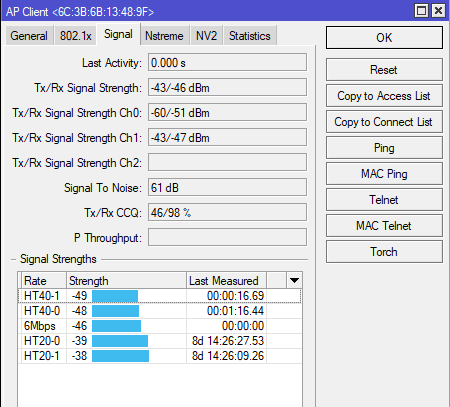
I doubd there was much going through when I took the screenshot this morning.
We will push some traffic through and see what happens.
To pre-empt some scenarios :
What do I look for?
What does it mean if the CCQ drops further under traffic load?
If it does drop, how do we troubleshoot it, since LOS, Alignment and Distance are pretty much ruled out.
Alignment can definitely be improved, Your one chain is definitely out. 61/47 is not aligned.
There a are a few guys on that omni who’s ccq is jumping all over the place and not just Siler78, so getting everyone to align might help improve things.
Without a 360 scan photo on WESA’s node its difficult to see if there are any obstructions. Remember we using 5.8 GHz equipment so doesn’t like trees or branches even blowing in front of it.
Omni power output is much lower than a PtP tower and the more clients you have the reduced power output it can achieve.
You have a fixed throughput set on the Omni so anyone connecting with bad signal is going to struggle.
I would definitely start by looking at alignment.
Just to add…Does Siler78 even use his link…DNS is not even setup?
Sounds right . . . How much higher is the omni than the LHG . . . ?
Perhaps slightly bend the pole on which the LHG is mounted . . . Try to make the LHG tilt upwards a bit . . . And see if ure TX CCQ’s improve . . . If it does, then u know what ure problem is - drop the pole, losen the LHG’s bracket and add the same amount of tilt to the LHG as u did when bending the pole . . .
Alternatively . . . add staywires to the pole and tighten the staywires in the direction which the tilt is needed . . . Till optimal CCQ level is reached . . .
Adding Staywires to the pole should also help in keeping the signal and CCQ’s more stable due to less movement of the LHG caused by wind . . .
I’m not a fundi in this game . . . But we all learn as we go along . . . With the help and guidance of the Community I guess.
Hopefully this helps . . .
Both the Omni and LHG are at exactly the same height, only 150m apart. Both masts have been checked to be level.
Absolutely zero obstacles / trees / anything inbetween.
Based on your suggestions , looks like we will have to re-check that the alignment is 100%, although it looked spot on last weekened when we were up there.
@TheClown you can try fiddling with the data rates aswell, to improve…
I had the same problem, had to fiddle with the data rates to get better ccq, it might help or it might not…I was like 300m away from a highsite, no obstacles ect…did a bit googling on data rates ect…experiment with it and did some testing…ccq was better than before…like I said it might help or might not.
@TheClown
Another thing I forget to mention and thought of only later, was the TX power level . . .
Being located so close to the Access point could also cause a bad connection due to the client and AP basicly shouting at each other while in close proximity - it could help to adjust the TX power setting on that LHG - Try using a lower power level (default power level is factory set at 17 I think) . . .and then keep adjusting it in increments untill you see an improvement in your signal strength and CCQ’s . . .
Hopefully this helps . . .
 )
)