#Problem Description:
Can’t connect to Mercury3.
#Your details: Crysie#8264
#WUG-Check Script outputwug-check.bat and post the output below between the backticks below:
--------------
Start!
--------------
Fri 10/13/2017
09:31 PM
--------------
----------
systeminfo
----------
Host Name: CRYSTAL-PC
OS Name: Microsoft Windows 7 Ultimate
OS Version: 6.1.7601 Service Pack 1 Build 7601
OS Manufacturer: Microsoft Corporation
OS Configuration: Standalone Workstation
OS Build Type: Multiprocessor Free
Registered Owner: CRYSTAL
Registered Organization:
Product ID: 00426-OEM-8992662-00400
Original Install Date: 4/22/2012, 10:13:53 PM
System Boot Time: 10/13/2017, 8:42:06 PM
System Manufacturer: LENOVO
System Model: 7663WPQ
System Type: X86-based PC
Processor(s): 1 Processor(s) Installed.
[01]: x64 Family 6 Model 15 Stepping 11 GenuineIntel ~1188 Mhz
BIOS Version: LENOVO 7LET51WW (1.21 ), 8/22/2007
Windows Directory: C:\Windows
System Directory: C:\Windows\system32
Boot Device: \Device\HarddiskVolume1
System Locale: en-us;English (United States)
Input Locale: en-us;English (United States)
Time Zone: (UTC+02:00) Harare, Pretoria
Total Physical Memory: 2,014 MB
Available Physical Memory: 319 MB
Virtual Memory: Max Size: 4,029 MB
Virtual Memory: Available: 1,576 MB
Virtual Memory: In Use: 2,453 MB
Page File Location(s): C:\pagefile.sys
Domain: WORKGROUP
Logon Server: \\CRYSTAL-PC
Hotfix(s): 215 Hotfix(s) Installed.
[01]: KB2849697
[02]: KB2849696
[03]: KB2841134
[04]: KB2670838
[05]: KB971033
[06]: KB2393802
[07]: KB2397190
[08]: KB2479943
[09]: KB2491683
[10]: KB2506212
[11]: KB2506928
[12]: KB2509553
[13]: KB2533552
[14]: KB2545698
[15]: KB2547666
[16]: KB2552343
[17]: KB2560656
[18]: KB2563227
[19]: KB2564958
[20]: KB2579686
[21]: KB2604115
[22]: KB2620704
[23]: KB2621440
[24]: KB2631813
[25]: KB2633171
[26]: KB2640148
[27]: KB2644615
[28]: KB2647753
[29]: KB2654428
[30]: KB2660075
[31]: KB2661254
[32]: KB2667402
[33]: KB2676562
[34]: KB2679255
[35]: KB2685811
[36]: KB2685813
[37]: KB2690533
[38]: KB2698365
[39]: KB2705219
[40]: KB2719857
[41]: KB2726535
[42]: KB2727528
[43]: KB2729094
[44]: KB2732059
[45]: KB2732487
[46]: KB2736422
[47]: KB2742599
[48]: KB2750841
[49]: KB2761217
[50]: KB2763523
[51]: KB2770660
[52]: KB2773072
[53]: KB2786081
[54]: KB2799926
[55]: KB2800095
[56]: KB2807986
[57]: KB2808679
[58]: KB2813170
[59]: KB2813347
[60]: KB2813430
[61]: KB2820331
[62]: KB2834140
[63]: KB2840631
[64]: KB2843630
[65]: KB2847927
[66]: KB2852386
[67]: KB2853952
[68]: KB2861698
[69]: KB2862152
[70]: KB2862330
[71]: KB2862335
[72]: KB2864202
[73]: KB2868038
[74]: KB2868116
[75]: KB2871997
[76]: KB2884256
[77]: KB2891804
[78]: KB2892074
[79]: KB2893294
[80]: KB2893519
[81]: KB2894844
[82]: KB2900986
[83]: KB2908783
[84]: KB2911501
[85]: KB2912390
[86]: KB2918077
[87]: KB2919469
[88]: KB2929733
[89]: KB2931356
[90]: KB2937610
[91]: KB2943357
[92]: KB2952664
[93]: KB2966583
[94]: KB2968294
[95]: KB2970228
[96]: KB2972100
[97]: KB2973112
[98]: KB2973201
[99]: KB2973351
[100]: KB2977292
[101]: KB2978120
[102]: KB2978742
[103]: KB2984972
[104]: KB2985461
[105]: KB2987107
[106]: KB2991963
[107]: KB2992611
[108]: KB2999226
[109]: KB3003743
[110]: KB3004361
[111]: KB3004375
[112]: KB3006121
[113]: KB3006137
[114]: KB3008923
[115]: KB3010788
[116]: KB3011780
[117]: KB3013531
[118]: KB3019978
[119]: KB3020369
[120]: KB3020370
[121]: KB3021674
[122]: KB3021917
[123]: KB3022777
[124]: KB3023215
[125]: KB3030377
[126]: KB3035126
[127]: KB3037574
[128]: KB3042058
[129]: KB3042553
[130]: KB3045685
[131]: KB3046017
[132]: KB3046269
[133]: KB3054476
[134]: KB3055642
[135]: KB3059317
[136]: KB3060716
[137]: KB3061518
[138]: KB3067903
[139]: KB3067904
[140]: KB3068708
[141]: KB3071756
[142]: KB3072305
[143]: KB3074543
[144]: KB3078601
[145]: KB3078667
[146]: KB3080079
[147]: KB3080149
[148]: KB3084135
[149]: KB3086255
[150]: KB3092627
[151]: KB3093513
[152]: KB3097989
[153]: KB3101722
[154]: KB3102429
[155]: KB3107998
[156]: KB3108371
[157]: KB3108381
[158]: KB3108664
[159]: KB3109103
[160]: KB3109560
[161]: KB3110329
[162]: KB3118401
[163]: KB3121255
[164]: KB3122648
[165]: KB3123479
[166]: KB3126587
[167]: KB3127220
[168]: KB3133977
[169]: KB3134814
[170]: KB3135445
[171]: KB3137061
[172]: KB3138378
[173]: KB3138612
[174]: KB3138910
[175]: KB3139398
[176]: KB3139914
[177]: KB3139929
[178]: KB3140245
[179]: KB3141092
[180]: KB3142024
[181]: KB3142042
[182]: KB3145739
[183]: KB3146706
[184]: KB3146963
[185]: KB3147071
[186]: KB3148851
[187]: KB3149090
[188]: KB3150220
[189]: KB3150513
[190]: KB3154070
[191]: KB3156016
[192]: KB3156019
[193]: KB3159398
[194]: KB3160005
[195]: KB3161102
[196]: KB3161949
[197]: KB3161958
[198]: KB3170106
[199]: KB3170455
[200]: KB3172605
[201]: KB3175443
[202]: KB3177467
[203]: KB3179573
[204]: KB3181988
[205]: KB3184143
[206]: KB3185319
[207]: KB3210131
[208]: KB4014504
[209]: KB4014565
[210]: KB4019990
[211]: KB4040980
[212]: KB976902
[213]: KB976932
[214]: KB982018
[215]: KB4041681
Network Card(s): 2 NIC(s) Installed.
[01]: Intel(R) 82566MM Gigabit Network Connection
Connection Name: Local Area Connection
DHCP Enabled: No
IP address(es)
[01]: 172.18.145.1
[02]: fe80::29d2:eb66:5b03:be71
[02]: Intel(R) PRO/Wireless 3945ABG Network Connection
Connection Name: Wireless Network Connection 2
DHCP Enabled: Yes
DHCP Server: 10.0.0.2
IP address(es)
[01]: 10.0.0.4
[02]: fe80::b8ef:35d1:a5bf:f7e6
--------
ipconfig
--------
Windows IP Configuration
Wireless LAN adapter Wireless Network Connection 2:
Connection-specific DNS Suffix . : Home
Link-local IPv6 Address . . . . . : fe80::b8ef:35d1:a5bf:f7e6%22
IPv4 Address. . . . . . . . . . . : 10.0.0.4
Subnet Mask . . . . . . . . . . . : 255.255.255.0
Default Gateway . . . . . . . . . : 10.0.0.2
Ethernet adapter Local Area Connection:
Connection-specific DNS Suffix . :
Link-local IPv6 Address . . . . . : fe80::29d2:eb66:5b03:be71%11
IPv4 Address. . . . . . . . . . . : 172.18.145.1
Subnet Mask . . . . . . . . . . . : 255.255.255.248
Default Gateway . . . . . . . . . : 172.18.145.6
Tunnel adapter isatap.{40C73686-11BA-44A9-A1B6-73BF904C831E}:
Media State . . . . . . . . . . . : Media disconnected
Connection-specific DNS Suffix . :
Tunnel adapter Local Area Connection* 11:
Media State . . . . . . . . . . . : Media disconnected
Connection-specific DNS Suffix . :
Tunnel adapter isatap.Home:
Media State . . . . . . . . . . . : Media disconnected
Connection-specific DNS Suffix . : Home
------
arp -a
------
Interface: 172.18.145.1 --- 0xb
Internet Address Physical Address Type
172.18.145.6 4c-5e-0c-08-b9-02 dynamic
172.18.145.7 ff-ff-ff-ff-ff-ff static
224.0.0.22 01-00-5e-00-00-16 static
224.0.0.251 01-00-5e-00-00-fb static
224.0.0.252 01-00-5e-00-00-fc static
224.0.1.60 01-00-5e-00-01-3c static
239.255.255.250 01-00-5e-7f-ff-fa static
Interface: 10.0.0.4 --- 0x16
Internet Address Physical Address Type
10.0.0.2 ec-22-80-5e-d7-a2 dynamic
10.0.0.6 00-1f-e2-1c-bb-f2 dynamic
10.0.0.255 ff-ff-ff-ff-ff-ff static
224.0.0.22 01-00-5e-00-00-16 static
224.0.0.251 01-00-5e-00-00-fb static
224.0.0.252 01-00-5e-00-00-fc static
224.0.1.60 01-00-5e-00-01-3c static
239.255.255.250 01-00-5e-7f-ff-fa static
255.255.255.255 ff-ff-ff-ff-ff-ff static
--------------
route -4 print
--------------
===========================================================================
Interface List
22...00 1c bf 2c 42 d6 ......Intel(R) PRO/Wireless 3945ABG Network Connection #3
11...00 1e 37 1a 34 aa ......Intel(R) 82566MM Gigabit Network Connection
1...........................Software Loopback Interface 1
23...00 00 00 00 00 00 00 e0 Microsoft ISATAP Adapter
10...00 00 00 00 00 00 00 e0 Microsoft Teredo Tunneling Adapter
24...00 00 00 00 00 00 00 e0 Microsoft ISATAP Adapter #2
===========================================================================
IPv4 Route Table
===========================================================================
Active Routes:
Network Destination Netmask Gateway Interface Metric
0.0.0.0 0.0.0.0 172.18.145.6 172.18.145.1 356
0.0.0.0 0.0.0.0 10.0.0.2 10.0.0.4 25
10.0.0.0 255.255.255.0 On-link 10.0.0.4 281
10.0.0.4 255.255.255.255 On-link 10.0.0.4 281
10.0.0.255 255.255.255.255 On-link 10.0.0.4 281
127.0.0.0 255.0.0.0 On-link 127.0.0.1 306
127.0.0.1 255.255.255.255 On-link 127.0.0.1 306
127.255.255.255 255.255.255.255 On-link 127.0.0.1 306
172.16.0.0 255.240.0.0 172.18.145.6 172.18.145.1 101
172.18.145.0 255.255.255.248 On-link 172.18.145.1 356
172.18.145.1 255.255.255.255 On-link 172.18.145.1 356
172.18.145.7 255.255.255.255 On-link 172.18.145.1 356
224.0.0.0 240.0.0.0 On-link 127.0.0.1 306
224.0.0.0 240.0.0.0 On-link 172.18.145.1 356
224.0.0.0 240.0.0.0 On-link 10.0.0.4 281
255.255.255.255 255.255.255.255 On-link 127.0.0.1 306
255.255.255.255 255.255.255.255 On-link 172.18.145.1 356
255.255.255.255 255.255.255.255 On-link 10.0.0.4 281
===========================================================================
Persistent Routes:
Network Address Netmask Gateway Address Metric
172.16.0.0 255.240.0.0 172.18.145.6 1
0.0.0.0 0.0.0.0 172.18.145.6 Default
===========================================================================
--------------------------
nslookup wind.ctwug.za.net
--------------------------
Non-authoritative answer:
Server: UnKnown
Address: 10.0.0.2
Name: centrifuge.ctwug.za.net
Address: 31.187.70.29
Aliases: wind.ctwug.za.net
-------------------------------------
nslookup wind.ctwug.za.net 172.18.1.1
-------------------------------------
*** Request to UnKnown timed-out
DNS request timed out.
timeout was 2 seconds.
Server: UnKnown
Address: 172.18.1.1
DNS request timed out.
timeout was 2 seconds.
DNS request timed out.
timeout was 2 seconds.
DNS request timed out.
timeout was 2 seconds.
DNS request timed out.
timeout was 2 seconds.
----------------------------------
nslookup wind.ctwug.za.net 8.8.8.8
----------------------------------
Non-authoritative answer:
Server: google-public-dns-a.google.com
Address: 8.8.8.8
Name: centrifuge.ctwug.za.net
Address: 31.187.70.29
Aliases: wind.ctwug.za.net
--------------------------
tracert -d -w 1000 8.8.8.8
--------------------------
Tracing route to 8.8.8.8 over a maximum of 30 hops
1 2 ms 1 ms 1 ms 10.0.0.2
2 * * * Request timed out.
3 36 ms 35 ms 52 ms 197.84.96.185
4 31 ms 27 ms 35 ms 197.84.96.186
5 53 ms 46 ms 53 ms 197.84.7.34
6 * 52 ms 54 ms 197.84.4.17
7 83 ms 54 ms 47 ms 197.80.7.73
8 59 ms 66 ms 48 ms 197.80.96.6
9 52 ms 52 ms 55 ms 72.14.239.33
10 73 ms 67 ms 51 ms 8.8.8.8
Trace complete.
-----------------------------
tracert -d -w 1000 172.18.1.1
-----------------------------
Tracing route to 172.18.1.1 over a maximum of 30 hops
1 172.18.145.6 reports: Destination net unreachable.
Trace complete.
------------------------------
tracert -d -w 1000 172.18.1.11
------------------------------
Tracing route to 172.18.1.11 over a maximum of 30 hops
1 172.18.145.6 reports: Destination net unreachable.
Trace complete.
--------------------------------
tracert -d -w 1000 172.26.66.132
--------------------------------
Tracing route to 172.26.66.132 over a maximum of 30 hops
1 172.18.145.6 reports: Destination net unreachable.
Trace complete.
---------------
Done!
---------------
Fri 10/13/2017
09:33 PM
---------------
1 Like
Hey @CDaniels , are you able to log into your RB?
Judging by the list of info provided I can see that your machine has two Network Devices (Lan and Wifi). Your traffic is going out of your Wifi Interface to Wug instead of your Lan Interface.
Could be that you dont have a route to mercury or that you just have a simple config issue on your machine.
1 Like
@CDaniels When did you notice this problem?
1 Like
I cannot see your connection to the sector, please log into your RB, scan and re-connect.
1 Like
spin
October 13, 2017, 11:01pm
6
Her main issue is she cannot connect to Mercury3. Not sure why? Alignment issue or something? Changed settings on her rb?
Hi all
it happened two days ago. Just stopped working.
I didn’t change anything on my pc. Bit of a techno peasant so would not have changed anything myself.
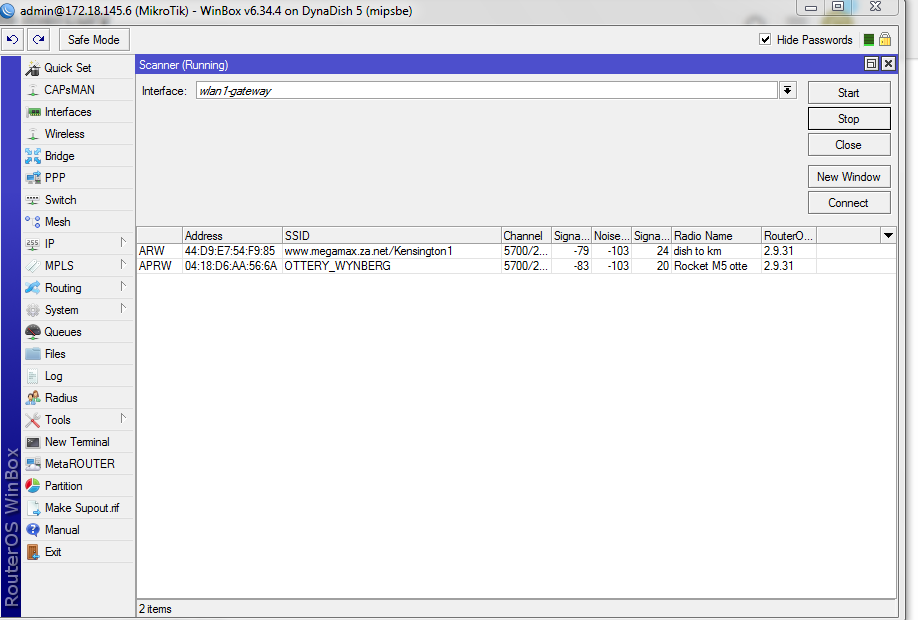
But looking at my RB I can even see Mercury on the scan could it be that the wind moved my dish?
Could you post a picture of your scan settings please.
spin
October 14, 2017, 9:23am
9
A post was split to a new topic: Looking for connection to Mercury
This is about all I can see at the moment
spin
October 14, 2017, 11:55am
11
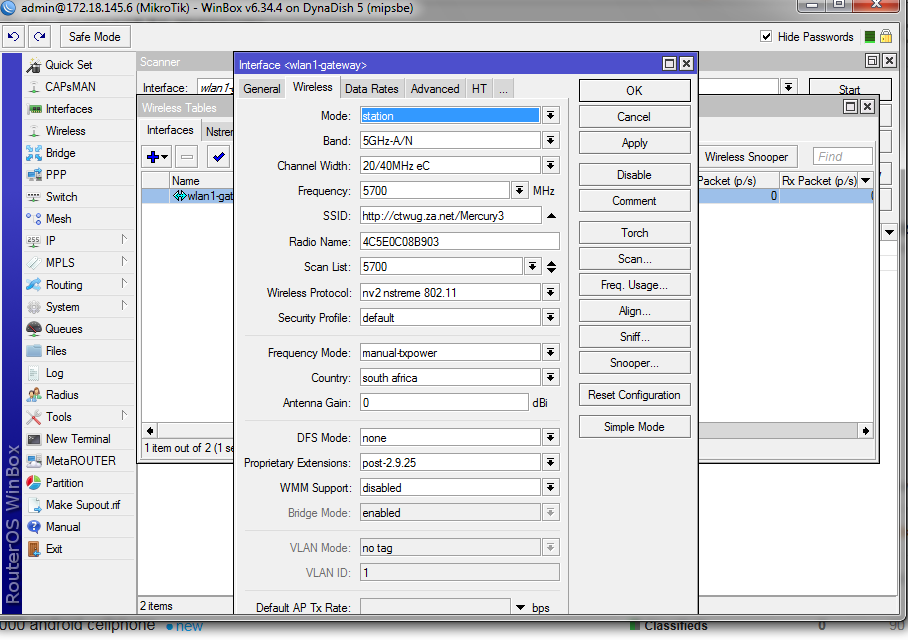
Post a capture of your wlan1-gateway wireless settings. Should be under wireless - interfaces and then open it and switch to the wireless tab.
Wolf
October 14, 2017, 2:19pm
13
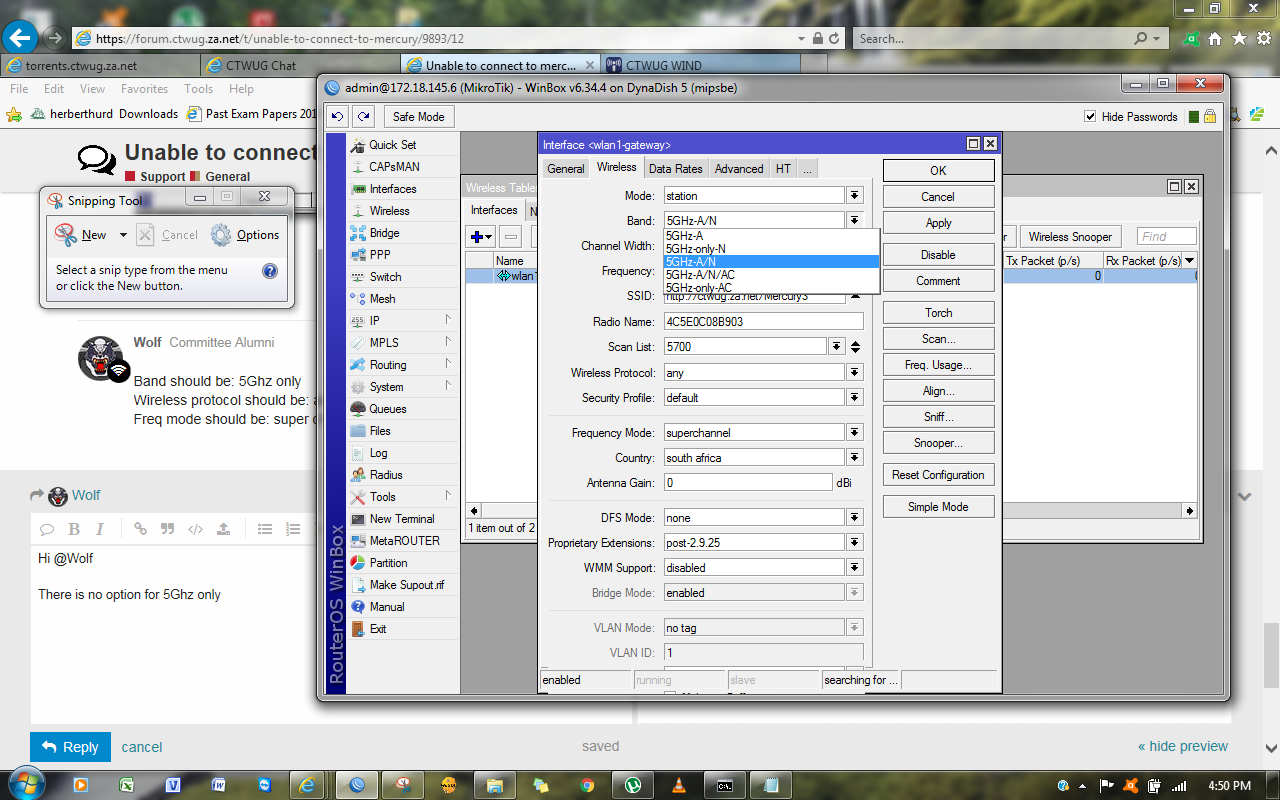
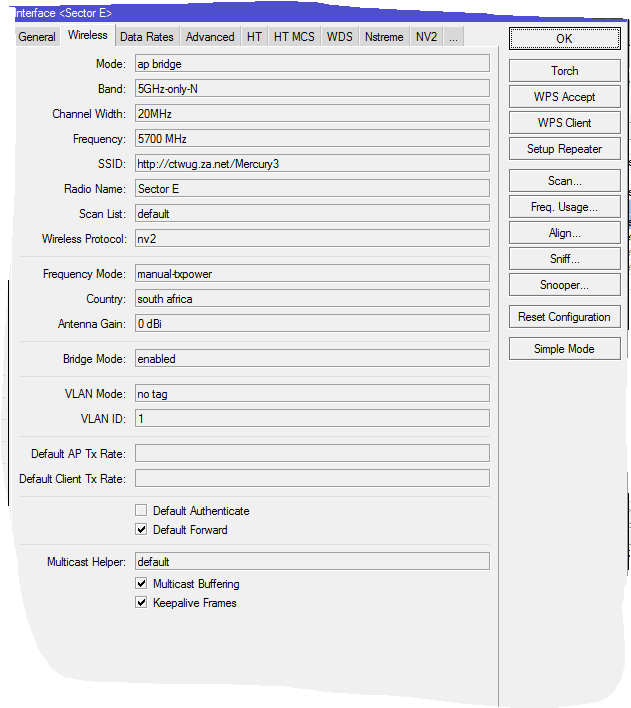
Band should be: 5Ghz N only
Hi @Wolf
There is no option for 5Ghz only
5Ghz A/N option will still choose 5Ghz N, If I’m not mistaken
I think my dish has moved as I am not seeing mercury at all on the scan
Going to realign again and see if helps
Is your ‘Frequency Mode’ setting on ‘Manual-TX’ or ‘Superchannel’.
‘Manual-TX’ wont scan all frequencies.
EDIT: Also change your country setting to Ireland.
1 Like