Unable to route to 172.18.1.12 via KM

Problem Description
I am unable to reach http://mail.ctwug.za.net, I get the following:
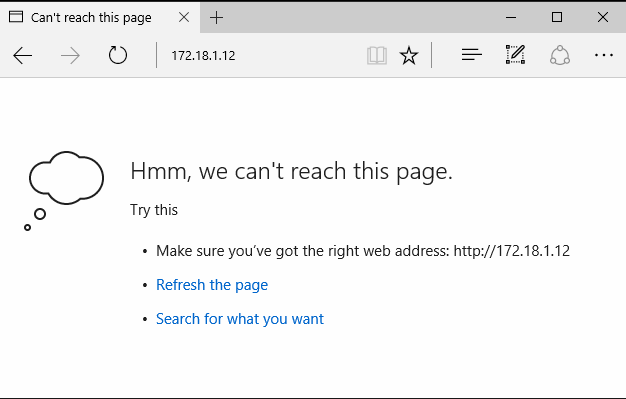
The traceroute to this reveals:
Tracing route to 172.18.1.12 over a maximum of 30 hops

1 <1 ms <1 ms <1 ms 192.168.0.1
2 <1 ms <1 ms <1 ms 172.26.65.254
3 <1 ms <1 ms <1 ms 172.26.65.251
4 6 ms 21 ms 17 ms 172.18.10.77
5 20 ms 3 ms 4 ms 172.18.10.6
6 9 ms 43 ms 54 ms 172.18.10.66
7 18 ms 13 ms 34 ms 172.18.239.9
8 26 ms 29 ms 19 ms 172.18.239.25
9 56 ms 8 ms 8 ms 172.18.239.253
10 * * * Request timed out.

30 * * * Request timed out.

Trace complete.

If I add a static route to my core 172.18.1.12 --> 172.26.65.253 (ironman link)
and a static route on ironman rb - 172.18.1.12 --> 172.18.115.189 (ironman rb)

I then am able to traceroute to the ip:
Tracing route to 172.18.1.12 over a maximum of 30 hops

1 <1 ms <1 ms <1 ms rbhome.mbd.za.net [192.168.0.1]
2 <1 ms <1 ms <1 ms 172.26.65.254
3 <1 ms <1 ms <1 ms 172.26.65.253
4 9 ms 5 ms 2 ms 172.18.115.189
5 6 ms 5 ms 5 ms 172.18.115.254
6 12 ms 6 ms 6 ms 172.18.115.180
7 53 ms 26 ms 28 ms 172.18.44.238
8 16 ms 8 ms 23 ms 172.18.44.252
9 13 ms 18 ms 14 ms 172.18.255.97
10 13 ms 13 ms 21 ms 172.18.110.221
11 14 ms 15 ms 30 ms 172.18.255.189
12 33 ms 22 ms 27 ms 172.18.248.194
13 29 ms 36 ms 34 ms 172.18.252.166
14 41 ms 36 ms 24 ms 172.18.60.233
15 194 ms 183 ms 169 ms 172.18.1.137
16 184 ms 170 ms 189 ms 172.18.1.12

Trace complete.

Now if I browse to http://mail.ctwug.za.net:

It is when routed via wugpi.km.ctwug.za.net (@spin) that I cannot reach the mail server, often WinD & Forum also does not work.

Your details
Node:
PC IP: 172.26.65.24
RB IP: 172.26.65.254
RB has ctwug/ctwug login?: yes

TRACERT
On command line run these and paste output here.
tracert 172.18.1.1
Tracing route to 172.18.1.1 over a maximum of 30 hops

1 <1 ms <1 ms <1 ms 192.168.0.1
2 <1 ms <1 ms <1 ms 172.26.65.254
3 <1 ms <1 ms <1 ms 172.26.65.253
4 6 ms 8 ms 2 ms 172.18.115.189
5 2 ms 1 ms 3 ms 172.18.115.246
6 7 ms 9 ms 5 ms 172.18.72.33
7 6 ms 5 ms 6 ms 172.18.72.4
8 8 ms 10 ms 18 ms 172.18.72.38
9 27 ms 13 ms 10 ms 172.18.1.1

Trace complete.

tracert 172.18.1.11
Tracing route to 172.18.1.11 over a maximum of 30 hops

1 <1 ms <1 ms <1 ms 192.168.0.1
2 <1 ms <1 ms <1 ms 172.26.65.254
3 <1 ms <1 ms <1 ms 172.26.65.251
4 6 ms 21 ms 17 ms 172.18.10.77
5 20 ms 3 ms 4 ms 172.18.10.6
6 9 ms 43 ms 54 ms 172.18.10.66
7 18 ms 13 ms 34 ms 172.18.239.9
8 26 ms 29 ms 19 ms 172.18.239.25
9 56 ms 8 ms 8 ms 172.18.239.253
10 * * * Request timed out.

Trace complete.

tracert 172.18.1.5
Tracing route to 172.18.1.5 over a maximum of 30 hops

1 <1 ms <1 ms <1 ms 192.168.0.1
2 172.26.65.254 reports: Destination net unreachable.

Trace complete.
172.18.1.5 is not in the routes
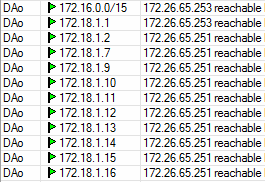
tracert 8.8.8.8

NSLOOKUP
On the command line run these and paste output here.
nslookup www.ctwug.za.net 172.18.1.1
Server: UnKnown
Address: 172.18.1.1

Non-authoritative answer:
Name: obliquity.ctwug.za.net
Address: 192.121.166.59
Aliases: www.ctwug.za.net

nslookup www.ctwug.za.net
Server: rbhome.mbd.za.net
Address: 192.168.0.1

Non-authoritative answer:
Name: obliquity.ctwug.za.net
Address: 192.121.166.59
Aliases: www.ctwug.za.net

1 Like

Great post. That’s how a request for help should look like!!!

I messed around a little last night and couldn’t route to your ip from those servers, but it was late.

I’ll have a look again.

2 Likes

I am experiencing an intermittent problem with OSPF on my routers too,
this will have affected you reaching my site, but the above tests were done
with everything functioning correctly.

I’m trying to check it out now but your OSPF is on the fritz. Will check again later and see if I can get in.

You need to fix your routing. Your 254 rb is unreachable outside your node.

I sem to have stabilised my OSPF, still cannot determine root cause. It was stable overnight. Found an article on Cisco that pointed to different MTU’s that cause OSPF to get stuck in ExStart state.

The original issue is still there.

Cool it’s better now at least I can see what you are seeing. I’m messing with it now.

I’ve spent some time looking at this and couldn’t figure it out yet. @Tinuva any ideas?

OK. After asking for help I figured it out. Basically the reason is that there is assymetric routing.

The lowest cost route from you to 172.18.1.11 (and all 172.18.1.12-15) is via wugpi.km
The lowest cost route back from 172.18.1.11 (and the rest) is via dns.jypels.

The above does not make sense, and normally shouldn’t be the case.

The result of this is though that at 172.18.1.11 the traffic comes in on one tunnel interface and out on another tunnel interface. By default this sort of thing is blocked on Linux. Which means 172.18.1.11 was blocking connections that come in on one interface but has replies going out on another.

This is called reverse path filtering. See: http://lartc.org/howto/lartc.kernel.html

I’ve turned this off now, but the underlying cause also needs to be understood. The asymmetric routing.

Rereading this I see it is not as clear as I should have made it. It should be fixed. We need to understand if the asymmetric routing is ok or if it is a problem in this case.

3 Likes

Great troubleshooting from JellyBean and Spin.

Have a look at 172.18.239.9 & 172.18.239.10. OSPF Interface cost between these two is 1 on the one RB, and 10 on the second one…

2 Likes

@spin the OSPF cost on 239.9 and 239.10 have been equalised. (thanks @controlc for the details of your find!)
Do you want to enable the RPF again and test again?

I won’t enable it again because it will pop up again just somewhere else. There is probably someone else with the same issue and they just didn’t take the time to report it. And in some cases there may be a valid reason for asymmetric routing (at least in theory).

It’s also difficult to diagnose (the rpf block, not the asymmetric routing). In fact I’m pretty sure I saw it in another situation but wasn’t able to diagnose then. It took a bit of time to track it down this time.

Now that I know about it I should see it quickly though.

I saw the asymmetric routing pretty much immediately, but didn’t know linux had such a block in place.

Ok cool, thank you all for the help! It is appreciated! @spin, @king, @controlc & @nyven
Thread can be closed.

1 Like

I’ll leave it open a bit to see if any other brilliant ideas pop up.

Generally speaking asymmetric routing is fine. I am surprised it wasn’t happening more than it does on the ctwug network, considering how many different admins we have on the network and everyone not following the same rules on which ospf cost number to apply on interface.

Its actually a good idea, to always make sure we disable reverse path filtering on all linux machines on the network that does routing, eg. the tunnel servers. Since there is no specific reason to force symmetric traffic.

The only times I had to make sure traffic route symmetrically, is when you work with firewall devices, or DPI devices that need to see both directions of a TCP conversation.

ps. On the internet you will find almost all traffic that routes to different geological locations are almost always routed asymmetrically.

2 Likes

Thanks was waiting for a professional to comment :slight_smile:

I’ve only disabled it on centrifuge as it handles all the tunnels where this could possibly happen. Don’t think it’s possible on any of our other wug servers except maybe our backup server. Will check that one out.

centrifuge has a firewall in place, but it’s all IP based. So I don’t expect it will be affected? It’s reasonably permissive on the wug side as well. Thoughts?

To be safe, I would also do it on the tunnel servers as well as on centrifuge. Reason being, the asymmetric traffic will pass over those as well in at least 1 directon, and they run linux which could also be dropping the packets.

Thinking about it more, technically I was slightly wrong in the way I described it works. RPF checks if the source IP is routable through the interface it came in on. If not it rejects packets from that source. It doesn’t check where return packets go. (See this article that describes it better).

The tunnel machine (raspberries mainly) tend to have one tunnel and one Ethernet interface. Typically the traffic comes in on the Ethernet (and would be routable from that Ethernet interface). Same with the return traffic. The return traffic source would be routable via the tunnel interface, that it comes in on.

The way the OSPF was setup for the services is having a stub area 0.0.0.1 with the raspberries as ABRs. Thus the asymmetry can’t occur at the raspberry. The asymmetric traffic would never be routable via the tunnel and Ethernet as we stop routes going via the tunnels back to the wug (by having a stub area). And in fact RPF is another protection for this now.

Based on this I don’t think this is needed to remove RPF from tunnel devices unless of course we add multiple interfaces either to the wug or to the services area.