Sorry for the very late reply will do it now.
Looks great and its responsive… click and its there
Done and it works! Before I did not even get the mail with the link to reset the password but now I see it in my spam folder. Thanks again Spin
Once we hook it up to all the tunnels it will be even faster on the wug 
Are you still busy with cleaning up the new WIND? Compared to the old WIND, this new edition looks very ‘rushed’.
Example, the node page. http://wind.ctwug.za.net/index.php/nodes?node=225
‘Links’ and “Node Subnetwork” looks very disorganized.
Lastly, all the lines are blue (Active) and red (Not Active). How does one distinguish between the different types of connections (AC, ethernet etc.)?
Are you still busy with cleaning up the new WIND? Compared to the old WIND, this new edition looks very ‘rushed’.
Example, the node page. CTWUG WIND
‘Links’ and “Node Subnetwork” looks very disorganized.
Lastly, all the lines are blue (Active) and red (Not Active). How does one distinguish between the different types of connections (AC, ethernet etc.)?
We have discussed most of these points and we decided that getting thr new wind up and running before end January is more important than the color of the link-lines.
It will take some time to get the site looking pretty but it will get there.
I’m moving services and getting them up and running on their new sites. With clean and code tracked versions of the new sites we can improve them relatively easily, and also keep those improvements if upstream changes come through.
I’d suggest that you create issues for them on github. I do agree with some of the ones you raise.
We’d also appreciate pull requests (proposed code changes for those unfamiliar with the term) as it would be good to assist if you can code it. Also submit on github. The changes we make then are also shared with others and we also get their work on our instance. This will of course lead to some compromises (i.e. we won’t always get what we want exactly and we will have to accomodate the needs of others). But that would be better than having no developer community that support our WIND.
By the way we’ve teamed up with someone from West Australia Freenet. To manage our github. This was the only guy still submitting code changes to the original WIND repository. So I asked him if wants to team up for southern wind 
This is their wind: http://wafn.jolly.so/wind/index.php/nodes
And their main site: http://www.wafreenet.org/
We decide on code changes together with them.
We do need pull requests. /me looks at MDE?
Have added pull request
Cleaned my cache …still can’t get to WiND.
Wolf, post tracert wind.ctwug.za.net.
Can’t find it. It should be listed here: Pull requests · southern-wind/wind · GitHub
Yeah…also looking for it…will redo.
Microsoft Windows [Version 6.1.7601]
Copyright © 2009 Microsoft Corporation. All rights reserved.
C:\Users\Thor>tracert wind.ctwug.za.net
Tracing route to centrifuge.ctwug.za.net [172.18.1.11]
over a maximum of 30 hops:
1 <1 ms <1 ms <1 ms 172.18.232.13
2 <1 ms <1 ms <1 ms 172.18.232.14
3 2 ms 1 ms 2 ms 172.18.232.123
4 3 ms 7 ms 3 ms 172.18.226.1
5 26 ms 9 ms 19 ms 172.18.46.229
6 18 ms 15 ms 15 ms 172.18.46.230
7 17 ms 62 ms 24 ms 172.18.248.242
8 60 ms 21 ms 62 ms 172.18.254.217
9 14 ms 18 ms 21 ms 172.18.121.2
10 20 ms 40 ms 58 ms 172.18.247.146
11 59 ms 53 ms 21 ms 172.18.215.225
12 100 ms 86 ms 95 ms 172.18.252.153
13 51 ms 47 ms 83 ms 172.18.200.253
14 40 ms 127 ms 60 ms 172.18.200.246
15 62 ms * 51 ms 172.18.123.238
16 70 ms 39 ms 88 ms 172.18.123.243
17 * * * Request timed out.
18 * * * Request timed out.
19 * * * Request timed out.
20 * * * Request timed out.
21 * * * Request timed out.
22 * * * Request timed out.
23 * * * Request timed out.
24 * * * Request timed out.
25 * * * Request timed out.
26 * * * Request timed out.
27 * * * Request timed out.
28 * * * Request timed out.
29 * * * Request timed out.
30 * * * Request timed out.
Trace complete.
C:\Users\Thor>
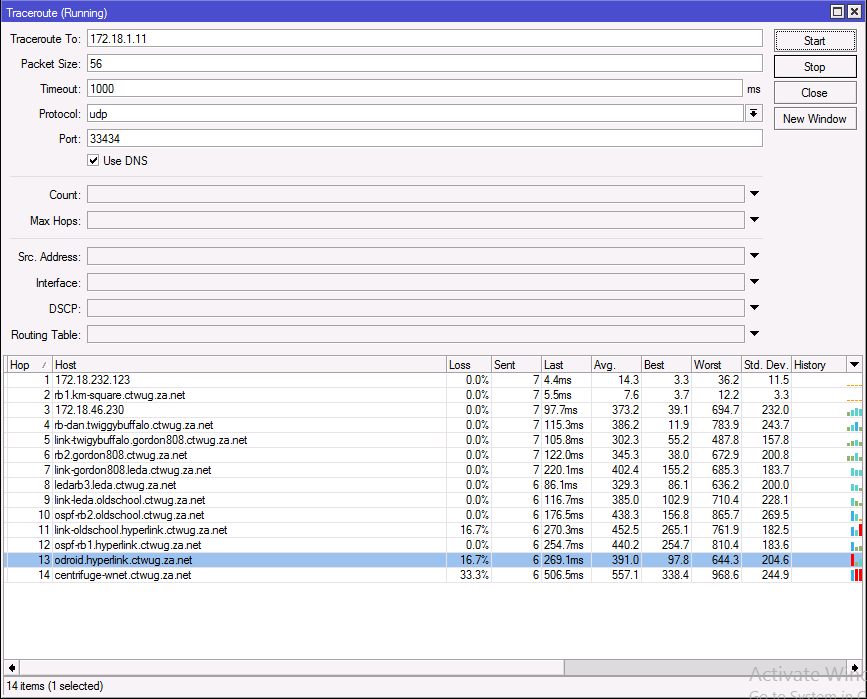
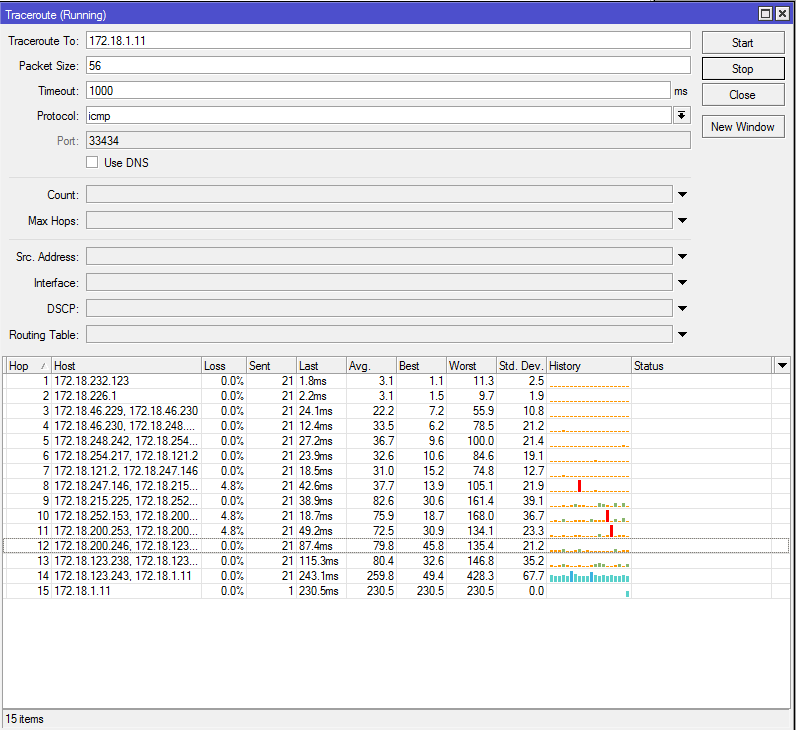
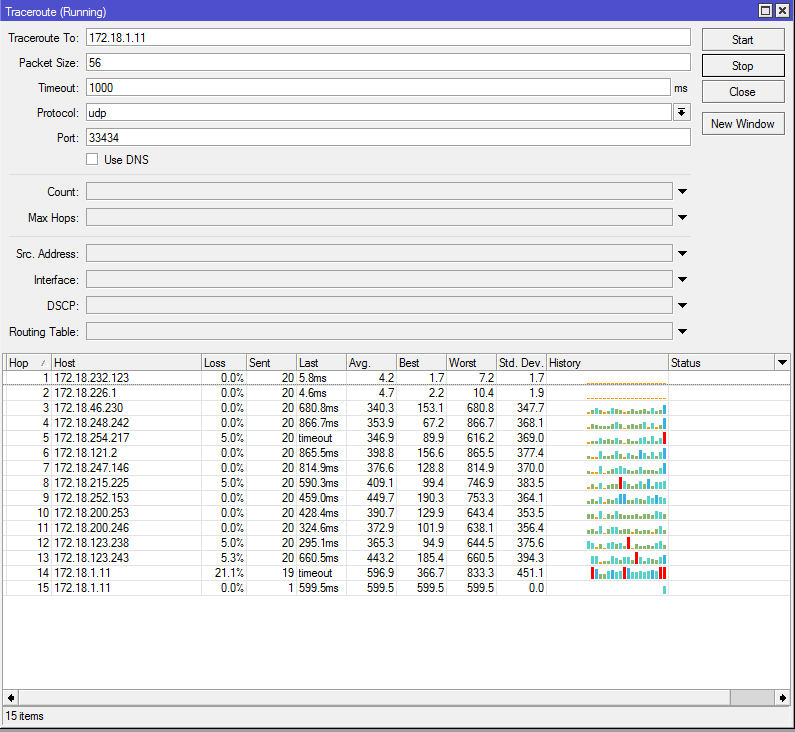
I can’t see who’s IP 172.18.46.230 is when doing a nslookup.
In that tracert, tick “Use DNS”
After waiting an eternity to log in, it is rb1.twiggy
So that could be where my problem is beginning?
Ok. So if I disable my link to KM Square, then the route goes via Airwolf and gets to WiND. So Twiggy-Buffalo link could be the problem. Will investigate a little further.