There are three ways afaik via quickset, the package manager and downloading the latest version from Mikrotik.
-
Quickset:
-
Package Manager:
-
Head to https://mikrotik.com/download or to https://downloads.ctwug.za.net/mikrotik/routeros/
Choose the right package - in my case SMIPS


Drag the package from your downloads folder in to Files in Winbox and reboot. It should do the upgrade automagically 

4.After rebooting the first time check if your firmware is also up to date (under System/Routerboard):
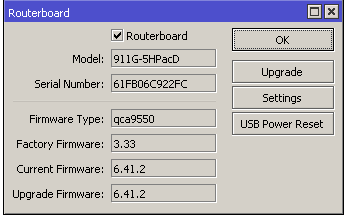
If current firmware and upgrade firmware don’t match click on upgrade and reboot your router again.
Edit: I should point out that there are some changes in the 6.41 version I think that maybe some of the other guys could explain. https://mikrotik.com/download/changelogs

