Another link here:
Basically they use the router (and WinBox) to hack the PC from the router.
Also see Mikrotik’s comments here:
The Wired article includes our comment and is pretty accurate. As far as we know, somebody exploited the already fixed chimayred vulnerability in open (no firewall) routers before we patched it in March 2017 (RouterOS v6.38.5). Upgrading RouterOS fixes the vulnerability and removes any malicious files.
Also worth noting, that Winbox no longer downloads any DLL files from your device anyway, since even before the above mentioned version.
Always keep your router up to date.
Please make sure your ROS is updated beyond 6.38.5.
Please ensure that, especially internet facing routers are updated and default IP service ports change to non standard port numbers. Obviously only having the necessary open on your firewall the better and drop the rest.
Email just received from Mikrotik:
Hello,
It has come to our attention that a rogue botnet is currently scanning random public IP addresses to find open Winbox (8291) and WWW (80) ports, to exploit a vulnerability in the RouterOS www server that was patched more than a year ago (in RouterOS v6.38.5, march 2017).
Since all RouterOS devices offer free upgrades with just two clicks, we urge you to upgrade your devices with the “Check for updates” button, if you haven’t done so within the last year.
More information can be found here: Urgent security advisory - Announcements - MikroTik community forum
Best regards,
MikroTik
So there is another exploit see here:
Mon Apr 23, 2018 12:05 pm
We have discovered a new RouterOS vulnerability affecting all RouterOS versions since v6.29.
How it works: The vulnerability allowed a special tool to connect to the Winbox port, and request the system user database file.
Versions affected: 6.29 to 6.43rc3 (included). Updated versions in all release chains coming ASAP. Edit: v6.42.1 and v6.43rc4 have been released!
Am I affected? Currently there is no sure way to see if you were affected. If your Winbox port is open to untrusted networks, assume that you are affected and upgrade + change password + add firewall. The log may show unsuccessful login attempt, followed by a succefful login attempt from unknown IP addresses.
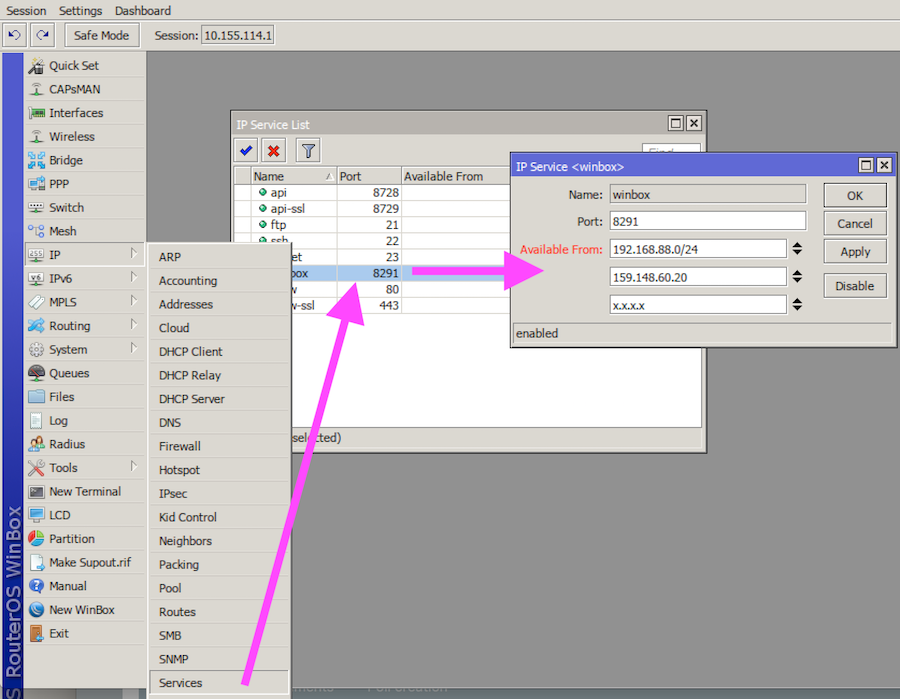
What do do: 1) Firewall the Winbox port from the public interface, and from untrusted networks. It is best, if you only allow known IP addresses to connect to your router to any services, not just Winbox. We suggest this to become common practice. As an alternative, possibly easier, use the “IP → Services” menu to specify “Allowed From” addresses. Include your LAN, and the public IP that you will be accessing the device from. 2) Change your passwords.
What to expect in the coming hours/days: Updated RouterOS versions coming ASAP. RouterOS user database security will be hardened, and deciphering will no longer be possible in the same manner.
EXAMPLE how to protect yourself:
I think it might be time to move up the CTWUG minimum required version to latest bugfix?
And time for some firewall rules to block Winbox from anywhere but local subnets (Or just disable it entirely?). Seems WebFig doesn’t have any known major vulnerabilities at the moment, and it works very well.
However as the wug isn’t exposed to the internet it shouldn’t be a major problem, but then again, prevention is generally better than cure.
We haven’t activated firewalls om the standard setup. Maybe just filter to local ips on service. The main risk for wug is probably non WMS private routers that are internet facing. The idea of min ROS is to encourage everyone to upgrade all routers.