WiND Node (link or at least name and number):
List your existing wireless equipment (but don’t buy anything):
Confirm with yes or no that you’ve read the getting started guide:
Description / Details of your issue below
WiND Node (link or at least name and number):
List your existing wireless equipment (but don’t buy anything):
Confirm with yes or no that you’ve read the getting started guide:
Description / Details of your issue below
Uhm did u read the guide properly? After plotting your node you should book a test kit and scan to see who you pick up and then contact the people that u picked up via wind or on here and then they will tell you if they have a spot and what equipment to get u can’t use your tenda n150 to join or scan
thanks. l will book the test kit
Hi @pkarairwa, let me know if you need guidance. One of the most common mistakes the I.T industry makes is to assume that everyone is as smart as them. We need to sometimes step down a notch and help a fellow brother/sister out.
The Tenda router you have is definitely not fit for the job as it is a unit designed for an indoor environment. Have a read through the Wiki and if you dont understand anything feel free to ask, there is no such thing as a stupid question, we all started somewhere.
thanks for the information. i had that tenda 2.4G fitted for me by my WISP
and l just read it had range of 5km so l thought l could possibly use since
my closest nodes were in that range. l will have to book the Test kit .
What model number is that Tenda device? I would like to look it up. Also, to connect using a 2.4ghz device the sector you are connecting to would need to be 2.4ghz and those are not very commonly used on the WUG, to my knowledge most of the devices running are 5ghz.
https://wind.ctwug.za.net/index.php/nodes?node=15910 - click on ‘List Topology to all AP nodes’, this will give you a rough but by no means 100% accurate guide of where to scan to with the test kit. A full 360 degree scan is recommended.
I had a look at your Node on Wind now, you are extremely close to Node Euro (no sector up there yet unfortunately), the Administrator of this node is @Trojan, perhaps speak to a couple of your buddies to get some community funding together to get a sector put up there, I’m sure he won’t mind.
Alternatively, book the test kit and post your scan results here.
Have a look at these devices when you get a chance:
1: https://scoop.co.za/mikrotik-omnitik-5ghz-11ac-poe-ap.html (5ghz Omni-Directional sector for clients to connect to)
2: https://scoop.co.za/mikrotik-light-head-grid-24-5dbi-dual-chain.html (Mikrotik 5ghz Antenna for getting you connected)
3: https://scoop.co.za/mikrotik-tripack-lhg5-24-5dbi-dual-chain.html (3x Mikrotik 5ghz Antennas in box for if you get friends to join, works out cheaer per unit.
Also test kits here:
Looks like you can see Venus2 quite clearly. Not sure if there’s space on that sector though?
Hey @pkarairwa, the scan to Node Venus in Parklands looks decent considering the distance. You only posted two scan pics, did you do a full 360 degree scan in segments? Scan in one direction and let the scan run for about 5-10 minutes, move slighly into a different direciton and repeat which you continue to do until you have covered 360 degrees.
Have you considered the below mentioned?
First contact for the Parklands area is @darkwing, he will be able to assist you further. According to Wind Node Venus might still have space for you depending on what hardware they are using there. CTWUG Highsite Rules.
Below information is to assist Darkwing. Node Euro might not be a client on that Venus sector anymore, @Trojan can confirm, I know they were in the process of moving but not sure if the move has been completed yet.

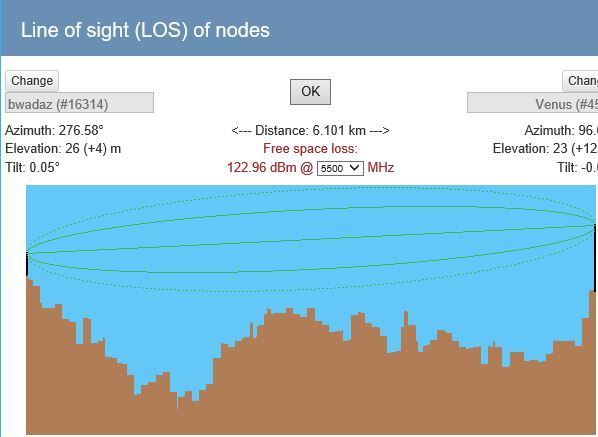
Thanks, Venus2 is still your best bet but you will need to wait for @darkwing to respond. Keep in mind that the guys do this in their free time so won’t always respond immediately.
@Jypels, I know you want to recommend hardware for this link? I was thinking SxT over 6km 
@pkarairwa, the SxT line is just a joke hey, don’t buy anything yet until Darkwing gets back to you.
@pkarairwa, just out of curiosity, what device did you scan with?
@Firestarter l used the LHG5
@pkarairwa, hang in there brother, @darkwing is an extremely busy guy.
I am still going to strongly suggest going with the above route, not only would you be able to get a connection without spending too much money but you would also be spreading the Wug love further by adding another point for people to connect to. @NetworkAdmins, does anyone know anyone who has a spare Sector lying around to either donate or sell at a good price for the cause? That area really needs it. Omni is not ideal I know but will work as a start or perhaps directional towards Dunoon area.
Hi Guys,
looks like i let this one slip for a while…
Venus2 should be ok @pkarairwa , but i’m not sure a LHG5 is ideal for the distance, i would go for a 5ghz dynadish
https://scoop.co.za/mikrotik-dynadish-5ghz-with-psu-and-gigabit-poe.html
unless someone else has found better equipment
@pkarairwa, Omni is up at Node Euro. You should have perfect line of site to it.
Thanks @Firestarter. I am not sure whether l should test again for signal because all along l was waiting for an answer after l posted my test results. Maybe l should just buy equipment.
No, don’t buy any equipment yet. Scan again for Euro


