
About
Scoop supports CTWUG by providing rebates on orders placed for CTWUG equpment. This allows CTWUG to use these rebates to further improve our network.
Ordering from Scoop
Please take note that all Scoop orders will be done via their online system with immediate effect. As it is virtually impossible to get passwords to everyone AND prevent possible abuse, the committee has put a temporary solution in place until we get an automated system in place to take over from this temp solution.
##To order from Scoop:
- Download the attached Excel sheet.
- Fill in your order.
- Check Scoops website to make sure the items are in stock.
- Please send the Excel sheet in an email to orders@ctwug.za.net
CTWUG Order v2.5.xlsx (69.2 KB) 2019-11-18
What happens then:
- Somebody will check your order and make sure it’s for CTWUG use.
- They will email you if there is an issue or if they are unsure.
- They will place the order on Scoop website.
- They will forward the necessary order number and costing detail to allow you to pay (directly to Scoop) for your order or pay on pickup.
- Please verify that it is correct before paying.
- Once paid, you are free to collect from Scoop (or pay on pickup - Cash/Credit or Debit card).
As it is a manual process, it may take a a little time, but will hopefully be quick, as we are close to 15 people manning that mailbox. If you experience issues, please let us know about those so we can fix where possible.
Please do not spam the orders@ctwug.za.net with email as it’s a distribution list.
And thank our volunteers for agreeing to help us out!
Scoop Order Admins
This post is to explain the order process and rules we need to follow when a wugger orders equipment from scoop. When someone needs to order they can find the excel spreadsheet here Ordering from Scoop - Read this!.
There is two parts to ordering.
Part 1
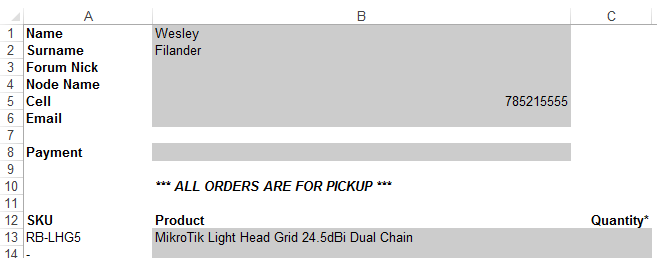
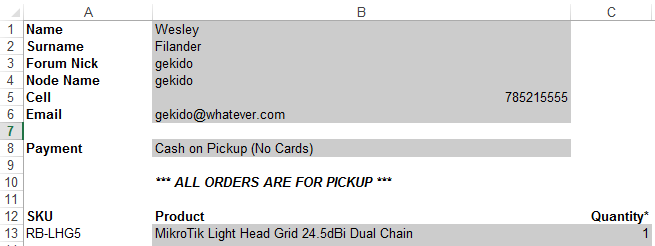
Check the order so that it has the following details:
- Name
- Surname
- Node Name
- Cell number
- Payment method
- Product and Quantity
Check for any suspicious ordering example bulk equipment or non ctwug Node. It’s important to remember that we need the rebate from scoop and it would be better to not place an order that would cost us our rebate. When in doubt ask in the scoop admin WhatsApp group and they should be able to assist.
Example of an incorrect order sheet:
Example of a correct order sheet:
Part 2
Placing the order from scoop
Scoop Admins are not allowed to process there own order
Scoop Admins can place any order, there is no admins for certain areas here
First you need to login
Username: *********
Password; *********
Please do not share this with anyone!!
- Check the order and search for the item/s on scoop site
- Click on the item and choose the quantity and add to cart. (Check the stock level of Scoop CT)
- Top right corner click on the cart and select checkout
Check out page.
- Billing information - leave unchanged
- Shipping information - leave unchanged
- Shipping Method - leave ucnhanged
- (Payment information) you need to select payment method that is supplied on order form.
- is an overview of what the order is. If you are happy order is correct you click on place order button
NB. If a client has selected the EFT option the funds has to clear in Scoops bank account before collection

You will receive an auto confirmation from scoop telling that your order has been placed there will also be a order number. The order will reflect the retail price. Please wait for the proforma invoice to send to client as this reflects the correct price and also indicates the order is ready. The proforma could sometimes take a while to come through and you could provide the client with an order number in the meantime.
WhatsApp group rules
This group is here for one reason and one reason only to place orders online scoop. When you receive and order via email please let the group know that you will be placing the order.
The DONT’S for this group
- Jokes
- Funny pics or even pics that has nothing to do with this group
- Chats not relating to the reason for this group
- Sales pics or posts

